GENERAL
TIXR is the only authorized ticket seller for Ardmore Music Hall, and purchasing tickets elsewhere is at your own risk.
Contact the AMH Box Office:
610.649.8389 ext 1
info@ardmoremusichall.com
Box Office Hours:
12-5PM – Mondays, Wednesdays & Fridays
Plus on nights when we have public events
Please note: On a busy show night, we may not be able to sell tickets for a future show until most of the guests for the night have been checked in.
We may be closed on or around holidays, when there’s inclement weather, or other unforeseen issues. Please check our social media pages for updates in abnormal times.
When our box office is open, we are available to sell tickets and answer questions for shows at the following venues, festivals and concert series:
Underground Arts | MilkBoy | The Colonial Theater
Outdoors: Sing Us Home Festival | Concerts Under The Stars | Wayne Music Fest | Bryn Mawr Twilight Concerts | Ardmore Rock N Ride
Plus other Rising Sun Presents Shows at various other venues where RSP pops up around Philadelphia.
We are also available to sell gift cards, memberships, merchandise, and to answer any show and ticket related questions. CLICK HERE to learn more and to join the club!
Avoid Paying Fees
Purchase tickets in person at our box office (hours above)
Become a Friends with Benefits, Ambassador, or Mega-Ambassador level Ardmore Music Club Member. CLICK HERE to learn more and to join the club!
Tickets purchased in person are generally fee-free. The only in-person fees that apply are 3.5% for credit card processing. Cash payments incur no fees.
We do not facilitate phone transactions unless you are a member of the Ardmore Music Club (Friends with Benefits tier or higher).
No Refund Policy
All sales are final. We don’t issue any refunds or exchanges unless a show is postponed or cancelled.
As a small independent business, refunds and exchanges are not sustainable, please consider purchasing ticketing insurance which is offered on all online ticket purchases.
Is Ardmore Music Hall ADA compliant? How do I purchase tickets with accessible seating?
Yes! Ardmore Music Hall is ADA compliant and offers a few accessible seating options. Please contact us with your ADA request prior to the show, so we can be sure to accommodate.
You can purchase tickets online OR over the phone. If you purchase tickets online, we encourage you to call or email us prior to the show and let us know how we can best ensure you have a comfortable and fun experience. Bathrooms and other facilities are ADA compliant, and our staff is always happy to help while you’re here at the Ardmore Music Hall. Contact us at info@ardmoremusichall.com or 610-649-8389 for more information or assistance.
How old do I need to be to attend shows?
All of our concerts are 21+ events. However, minors may attend ONLY if accompanied by their parent or legal guardian (must have proof), who assumes responsibility at all times. Minors must have the same ticket type (General Admission or seated) as legal guardian.
Do I need any ID to enter the venue?
Yes, at all times. Expired ID will NOT be accepted.
Does AMH have a bag policy?
We do not have restrictions pertaining to size or material of bags, but all are subject to search by security upon entrance. No outside food, beverage, weapons or drugs are permitted within the venue.
EXPERIENCE QUESTIONS
Does the venue have seating?
We offer a seated ticket type for almost every event. To guarantee you sit for a show, you will need to purchase one of our seated ticket options. Please be sure to read the ticket description for whatever show you may be interested in, as we do arrange the room differently each night.
If you purchase a seated ticket, a guaranteed seat is included in the price of admission, but they are not assigned; seat choice is on a first come, first serve basis. For fully general admission shows, we do not take reservations for parties smaller than 12 people. If you’re interested in bringing a large party, you can contact us at info@ardmoremusichall.com
Do you serve food?
Yes, our in-house kitchen is open and serving food during all events. Our menu is prepared fresh in-house. Check out all of our menus here.
What types of drinks are available?
Across 4 bars, we offer something for everyone including 30+ craft can & draught beers, thoughtful cocktails, wine and non-alcoholic beverages.
Where do I park?
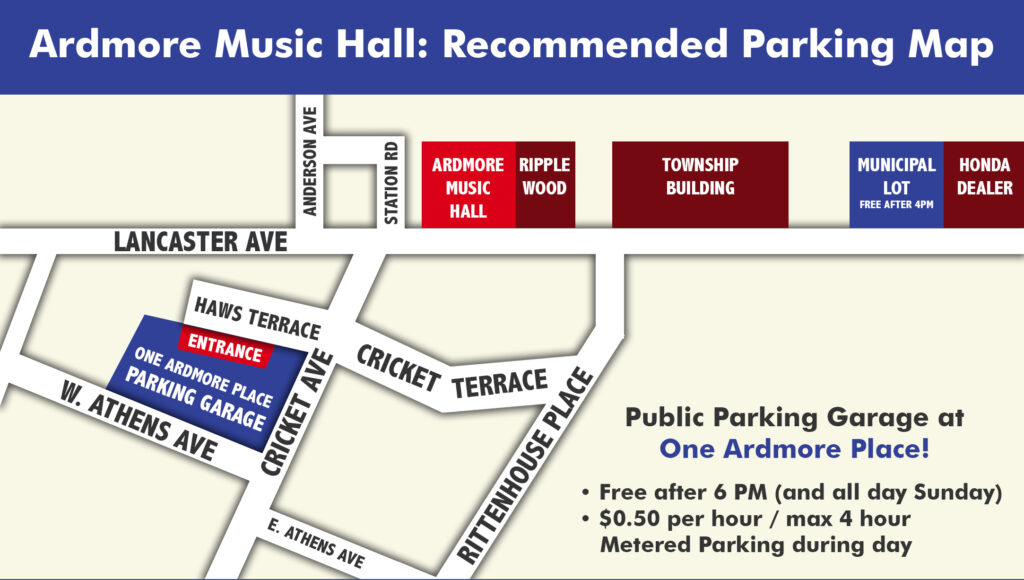
There are numerous lots in the immediate area, like right across the venue by Tired Hands. Some spots are metered, and some lots are accessible on some nights but not others; there are plenty of options, but read the signs around you to see if you have to pay, so you don’t get ticketed. We also recommend checking out the parking garage on Cricket Ave, it’s free after 6pm or $2 for 4 hours all other times.
Any recommended hotels in the area?
Use this link to receive a discounted rate with The Drexelbrook/Holiday Inn in Drexel Hill.
ACCESSING TICKETS VIA TIXR FAQ
How do I access my tickets?
Two Options: NFC (Digital Wallet) or QR via the TIXR App
Pro-Tip: Confirm your TIXR Log-In information BEFORE you leave for the show! You will need to log into your TIXR account to access tickets with either option.
NFC ticketing uses Near Field Communication to let guests enter by tapping their phone or smart device at the door. The ticket lives securely in a mobile wallet (like Apple Wallet or Google Wallet) and validates instantly—no screenshots, no paper, faster scans, and reduced fraud.
To access and download your tickets, check your confirmation email from TIXR (the sender is no-reply@tixr.com). You must click the blue button and log-in to add your tickets directly to your smartphone’s Apple Wallet or Google Wallet.
The TIXR App is another way to access your tickets. It is also the best place to utilize features like transfers, resale and waitlist when available.
To access and download your tickets, first download the TIXR App. Log-in and you will see all of your upcoming shows on TIXR. Tap on the correct show and you will see the rotating QR Code, as well as an option to download to your phone’s digital wallet. Venue staff will help you scan your ticket and get you in the door.
Is the TIXR App Required?
No. The TIXR app is NOT required. Please see NFC ticketing above if you are app-adverse.
The TIXR app is not required, but you must be able to sign into your TIXR account to access tickets as well utilize features like transfers, resale and waitlist when available.
Do I need to do this before arriving?
Yes. We strongly recommend logging into your TIXR account, and either adding your tickets to your wallet or downloading the TIXR app in advance to avoid delays at entry.
Can I use a screenshot of my ticket?
No. Screenshots will not scan. Tickets must be accessed through your phone’s wallet or the Tixr app.
Will I need Wi-Fi or cell service at the venue?
No. Once your ticket is added to your wallet, an internet connection is not required for entry. This is why it is best to follow these steps in the days prior to the show.
How do I enter the venue?
When you arrive, open your ticket in your wallet (it may appear automatically on your lock screen) and hold your phone near the scanner at the door.
What if my phone dies?
A powered-on phone is required for entry. Please arrive with your phone charged.
What if I’m having trouble accessing my tickets?
Our box office team can print tickets at will-call the night of the event. Please bring a valid photo ID so we can assist you.
Why are tickets only available this way?
To prevent fraud, all tickets are delivered digitally via the TIXR app or your smartphone wallet. PDF tickets cannot be sent.
TRANSFERRING TICKETS
LEARN MORE VIA TIXR’S FAN SUPPORT
Ticket transfers are intended only for gifting tickets to another individual, not for resale. We strongly recommend purchasing tickets directly from our website to guarantee validity. Tickets obtained through individuals, brokers, or secondary marketplaces are not supported and may be invalid.
Can I transfer my tickets to someone else?
Yes — if the Transfer option is enabled for your event, you can send your tickets to another person through your TIXR wallet.
How do I transfer my tickets?
1. Log in to your Tixr account (app or browser).
2. Open your Wallet and select the event.
3. Tap or click Transfer.
4. Choose the ticket(s) you want to send and enter the recipient’s email.
5. Complete the transfer — the recipient will receive an email with instructions to claim the ticket.
TIXR Support
Does the recipient need a TIXR account?
Yes — to accept the transfer, the recipient must log in or create a Tixr account with the email you used.
Can I cancel or undo a transfer?
Only before the recipient accepts it. If accepted, the transfer can’t be undone.
Can I transfer to more than one person?
You can send the transfer offer to multiple emails, but once one recipient accepts it, the ticket is no longer available for others.
Can’t I just send a screenshot?
To prevent fraud, tickets are delivered and transferred securely through the Tixr platform via NFC technology. There is no barcode or QR code to screenshot.
RESALE
Can I resell my tickets?
Resale within TIXR is not always available. It’s typically only enabled once a show is sold out, and not all ticket types qualify. If resale is available, you’ll see a Sell option in your TIXR Wallet.
How do I resell my tickets?
Log in to Tixr.com using a mobile or desktop browser (resale is not supported in the app). Go to your Wallet, select the event, and click Sell.
Why don’t I see a Sell option?
If you don’t see Sell, resale is not enabled for that show or your ticket type.
Can I change or remove my resale listing?
Yes. You can adjust the price or remove your listing at any time before it sells, directly from your Wallet.
What happens after my tickets sell?
Your original tickets are voided and new tickets are issued to the buyer. Payouts are processed after the show—be sure your payout information is set up in advance.
Are there pricing limits?
Yes. Resale pricing limits are set per event.
WAITLIST
LEARN MORE VIA TIXR’S FAN SUPPORT
How does Waitlist Work?
You’re placed on a first-come, first-served waitlist.
Your card is pre-authorized but not charged until tickets are available and your spot is next.
You won’t be billed if tickets never become available.
How do I Join a Waitlist?
On the event page, add your desired tickets to your cart.
Click “Join Waitlist.”
Accept terms, choose how many days before the show your waitlist should expire, and check out.
Your card won’t be charged unless tickets are available and your order is fulfilled.
Is joining the waitlist a guarantee I’ll get tickets?
No. Joining the waitlist does not guarantee tickets. Inventory must become available (for example, from canceled or returned tickets), and waitlist orders are fulfilled on a first-come, first-served basis.
How do tickets become available for the waitlist?
Tickets only become available if additional inventory is released or if tickets are returned to the box office.
I have tickets to a SOLD OUT show and can’t use them. What should I do?
If you can no longer attend a sold-out show, contact the Ardmore Music Hall box office. If possible, we may be able to use your tickets to fulfill a waitlist order for another fan.
Can I update my waitlist order after I submit it?
Yes & No. You cannot change ticket quantity or type once placed — you must cancel and re-join (which loses your place).
You can update the payment method or expiration date via your TIXR Wallet.
Can I leave the Waitlist?
Yes, cancel anytime via your Wallet. You’ll lose your current position but can re-join if the waitlist is still open.
Important Waitlist Notes
A pending charge hold may appear when you join; it will drop off in a few days if no ticket is assigned.
If your card is declined when you’re next in line, your order is canceled and tickets go to the next person.
You’ll only be charged if all tickets in your order can be fulfilled.
You can’t see your numeric place on the waitlist.
Ardmore Music Hall Note
When a show sells out at Ardmore Music Hall, the Tixr Waitlist may be activated so fans can still try for tickets this way. Orders are fulfilled first-come, first-served and aren’t guaranteed.
APPLE “HIDE MY EMAIL” & ACCESSING YOUR TICKETS
What is Apple’s “Hide My Email” feature?
When you choose “Sign in with Apple” and select Hide My Email, Apple creates a private relay email address for your account instead of using your real email. This relay forwards messages to your actual inbox.
How does this affect my tickets?
If you use Hide My Email:
Your tickets and order confirmations are sent to Apple’s relay email, not your real address.
Apple then forwards those messages to you.
Unfortunately, these forwarded emails often land in spam or are filtered out, which can make it seem like your tickets never arrived.
Why can’t the venue email me directly?
Apple relay email addresses cannot receive direct emails from venues, promoters, or support tools. This means we may be unable to contact you with:
Show updates
Important ticket info
Support responses
Is “Hide My Email” required to use Sign in with Apple?
No. This is optional and chosen by the user. However, we currently cannot block or disable this option if you decide to use Apple sign-in.
What do you recommend?
To avoid missing important ticket information, we recommend: not using “Hide My Email” when signing up or logging in with Apple
I BOUGHT TICKETS THROUGH OTHER, SECONDARY MARKET SOURCES (IE., “SCALPERS” ONLINE OR IN PERSON) – ARE MY TICKETS LEGITIMATE?
Ardmore Music Hall DOES NOT ENDORSE USING ANY TICKETING SOURCES other than TIXR.COM for obtaining tickets to our events. Our Box Offices cannot resolve any issues involving third party ticketing platforms, such as lost tickets, duplicate, or otherwise fraudulent tickets. Tickets for all of our shows are sold through TIXR via our website, in person at the Box Office, and Main Street Music.
Tickets are sometimes available through fan club sites that offer as pre-sales or special VIP packages. Only use a site you know is being shared with you directly from the venue OR the Artist.
Ardmore Music Hall has the right to cancel ticket transactions that are suspected of being purchased for the sole purpose of reselling.
Third party “ticket resale” websites create the illusion that they have “special access” to the best seats in the house, or that they are authorized sellers for Ardmore Music Hall, none of which is true, nor is it a safe way to purchase tickets for our events, or any event. Always check the website URL. If you are not on a TIXR.com web listing, you are not in the right place.
Beware of any “Sponsored” links when searching for shows in web browsers. Often the first 3 or 4 options in any search will be from invalid ticket sellers, disguised as our venue. If you need help, contact us.
Not only do third party sites and individual ticket resellers often scam their buyers, the usually outrageous price markup goes directly to those entities, rather than the venue or the artist who put in the time, energy, and financial risk to bring independent, live music to fans.
Ardmore Music Hall cannot confirm that tickets purchased from anywhere other than Tixr.com, Ardmore Music Hall, or Main Street Music directly are valid. Please contact us BEFORE purchasing tickets if you have any doubt about whether you are buying from a legitimate source, and at the correct price. If a show is sold out and you see tickets available, purchasing those tickets is 100% at your own risk. If a show is not sold out or through the Artist’s Fan Club, you should never buy from a third party.
GETTING HERE
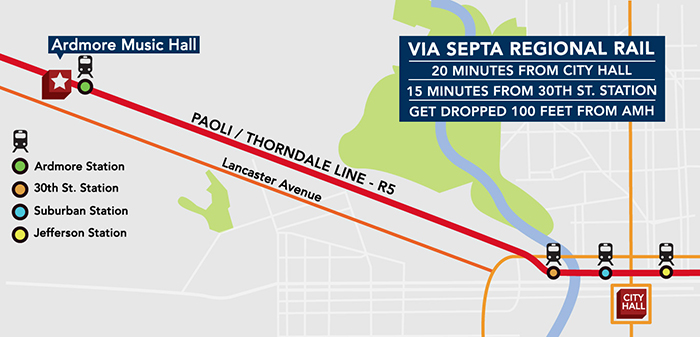
Ardmore Music Hall is located in the heart of the Main Line in downtown Ardmore, Pennsylvania. Less than 3 miles from Philadelphia, the venue is easily accessible by both car and public transportation.
For those traveling to and from Philadelphia who do not wish to drive, AMH is less than 100 feet from train tracks that are serviced by both SEPTA and Amtrak.